Desktop governance for mobile ecosystems
ADB AppControl, developed by Cyber.Cat, is a sophisticated graphical interface designed to bridge the gap between desktop and mobile environments. By leveraging the Android Debug Bridge (ADB) protocol, it provides a powerful alternative to the complex command-line tools typically used for deep system management.
Top Recommended Alternative

Intelligent debloating and application auditing
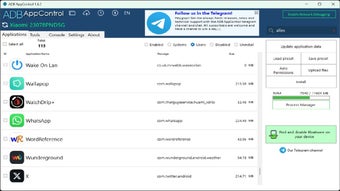
The software is centered around its Debloat Wizard, which is an automated tool that scans a connected device for pre-installed bloatware that usually cannot be disabled through standard settings. Users are presented with a categorized list that ranges safe and dangerous, allowing them to uninstall or freeze intrusive system applications without the need for root privileges. To enhance the user experience, an optional bridge called ACBridge can be installed on the mobile device, enabling the interface to display full-color application icons and human-readable names rather than cryptic package strings like com.android.providers.
Secure connectivity and remote command deployment
While initial connections are typically established via wired USB able to authorize the PC’s RSA key, ADB AppControl supports a robust Wireless ADB mode for ongoing management. This flexibility allows users to push APK files, manage permissions, and even take screenshots or record device screens over a local Wi-Fi network.
Beyond simple application management, the tool includes a built-in ADB Console and load preset feature, which allows IT administrators or enthusiasts to apply a consistent set of application rules and permissions across multiple devices simultaneously to ensure a uniform and secure device state. Users should keep in mind that they must still manually enable Developer Options and USB Debugging on their mobile device to initiate a connection.
Strategic oversight for modern device maintenance
ADB AppControl simplifies the interaction with system-level partitions by transforming a computer into a comprehensive command center for device optimization. It replaces complex terminal commands with a clean, searchable GUI for users of varying technical expertise, and includes support for managing devices over Wi-Fi to eliminate the need for constant physical tethering after setup.